If you ever notice a loooonng delay in compacting Outlook PST file, I strongly recommend running scanpst.exe on the PST file and then do a retry. ScanPST fixes certain errors in the PST file that allows the compacting process to not get blocked.
Recently I observed that compacting a 5.4 GB Outlook PST file to 2.7 GB took around 10 hrs on my Dell Latitude D630 laptop with an Intel Core 2 Duo processor!!
Wednesday, July 6, 2011

Monday, July 4, 2011
Fixing the error: Handler "PageHandlerFactory-Integrated" has a bad module "ManagedPipelineHandler" in its module list
In trying to setup a site on a Windows 2008 server, I ran into the following error message
Handler "PageHandlerFactory-Integrated" has a bad module "ManagedPipelineHandler" in its module list
Searching the forums suggested running aspnet_regiis.exe with the -i option.
Running aspnet_regiis resulted in an error, the details of which could be found in a log file it generates. The log file had the following message
Failure Changing IIS ApplicationHost.config: IIS7Register failed with HRESULT 800700b7: 'Cannot create a file when that file already exists
I was able to fix the above error following the steps outlined in this blog article. The article recommends replacing %windir% with the absolute path "C:\Windows" in isapiCgiRestriction section of \windows\system32\inetsrv\config\applicationHost.config for .NET 4.0. The replacement is not required for .NET 2.0. Strange, but it worked. Running aspnet_regiis.exe after making this change resulted in successful execution and also fixed the "bad module" error!!
Handler "PageHandlerFactory-Integrated" has a bad module "ManagedPipelineHandler" in its module list
Searching the forums suggested running aspnet_regiis.exe with the -i option.
Running aspnet_regiis resulted in an error, the details of which could be found in a log file it generates. The log file had the following message
Failure Changing IIS ApplicationHost.config: IIS7Register failed with HRESULT 800700b7: 'Cannot create a file when that file already exists
I was able to fix the above error following the steps outlined in this blog article. The article recommends replacing %windir% with the absolute path "C:\Windows" in isapiCgiRestriction section of \windows\system32\inetsrv\config\applicationHost.config for .NET 4.0. The replacement is not required for .NET 2.0. Strange, but it worked. Running aspnet_regiis.exe after making this change resulted in successful execution and also fixed the "bad module" error!!
Monday, June 20, 2011
Programatically binding ComboBox in sketchflow to a Collection
After a lot of trial and errors, I got the right steps to bind a ComboBox to my collection class. Given below are the steps for anyone out there looking for a solution.
1. Set the ItemsSource property to the collection
2. Set the DataContext property to the collection
3. Set the DisplayMemberPath property to the name of a field in the collection.
4. Set the SelectedValuePath property to the name of a field in the collection.
this.cmbProjects.ItemsSource = Globals.AllProjects.Collection;
this.cmbProjects.DataContext = Globals.AllProjects.Collection;
this.cmbProjects.DisplayMemberPath = "Name";
this.cmbProjects.SelectedValuePath = "Name";
1. Set the ItemsSource property to the collection
2. Set the DataContext property to the collection
3. Set the DisplayMemberPath property to the name of a field in the collection.
4. Set the SelectedValuePath property to the name of a field in the collection.
this.cmbProjects.ItemsSource = Globals.AllProjects.Collection;
this.cmbProjects.DataContext = Globals.AllProjects.Collection;
this.cmbProjects.DisplayMemberPath = "Name";
this.cmbProjects.SelectedValuePath = "Name";
Saturday, June 18, 2011
Setting SelectedIndex property of combobox resulted in "Specified argument was out of range" exception
While working on a SketchFlow prototype, I got this exception
"Specificed argument was out of range"
when attempting to set the value of ComboBox.SelectedIndex in the LayoutRoot_Loaded event handler. It used to occur randomly, so I concluded that this could be the result of some behavior not entirely under my control.
I got rid of this exception by setting the SelectedIndex propertly in the ComboBox_Loaded event handler. Hope this helps someone there with a similar issue. :)
"Specificed argument was out of range"
when attempting to set the value of ComboBox.SelectedIndex in the LayoutRoot_Loaded event handler. It used to occur randomly, so I concluded that this could be the result of some behavior not entirely under my control.
I got rid of this exception by setting the SelectedIndex propertly in the ComboBox_Loaded event handler. Hope this helps someone there with a similar issue. :)
Friday, June 17, 2011
Mockup controls for SketchFlow.
If you are a newbie to Microsoft Expression SketchFlow, I highly recommend
1. Start making use of the Mockup controls. Given below is a blog post that describes how to get the controls to appear in the Assets pane.
http://blogs.msdn.com/b/expression/archive/2010/05/13/how-to-add-mockup-controls-to-your-expression-blend-library.aspx
2. Use Sketchables for rapid development
http://www.hardcodet.net/2010/07/public-sketchables-preview-release#comments
1. Start making use of the Mockup controls. Given below is a blog post that describes how to get the controls to appear in the Assets pane.
http://blogs.msdn.com/b/expression/archive/2010/05/13/how-to-add-mockup-controls-to-your-expression-blend-library.aspx
2. Use Sketchables for rapid development
http://www.hardcodet.net/2010/07/public-sketchables-preview-release#comments
Monday, June 13, 2011
Sketch & Express!
I am in awe of SketchFlow! I have used Microsoft Word, Microsoft Visio, Microsoft PowerPoint to create prototypes, but SketchFlow blows them all out my list of preferred prototyping tools.
So what did I like in SketchFlow
1. Interactivity: None of the tools I used earlier helped me add interactivity. I was able to quickly add interactivity using C# code & some drag/drop.
2. Deploying packaged prototype to SharePoint: This feature makes the interactive prototype available for people to give feedback and also helps track versions. Love it!
3. Ability to chose between SketchFlow style and traditional development controls: The Pen/Pencil style of sketching/prototyping helps to keep the solution technology neutral and focus on the conceptual aspects of the application.
4. Map view: A view that shows me how pages are interlinked to each other. A great feature here is the ability to use a visual tags to make certain pages stand out.
So what did I like in SketchFlow
1. Interactivity: None of the tools I used earlier helped me add interactivity. I was able to quickly add interactivity using C# code & some drag/drop.
2. Deploying packaged prototype to SharePoint: This feature makes the interactive prototype available for people to give feedback and also helps track versions. Love it!
3. Ability to chose between SketchFlow style and traditional development controls: The Pen/Pencil style of sketching/prototyping helps to keep the solution technology neutral and focus on the conceptual aspects of the application.
4. Map view: A view that shows me how pages are interlinked to each other. A great feature here is the ability to use a visual tags to make certain pages stand out.
Thursday, June 9, 2011
Using Microsoft Excel 2010 for Web Project tracking
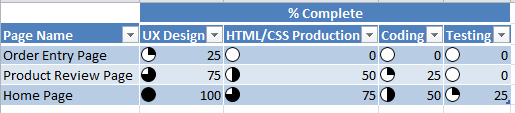
Conditional icons in Microsoft Excel 2010 are a great feature. I recently used it to report the status of Web Page development as seen in the screenshot.
Friday, May 20, 2011
Requirements Gathering - Lessons Learned.
Requirements gathering gets confusing when one starts reading about user stories, use cases, volere templates and numerous other techniques invented to capture them. Add to it, the techniques used to prioritize requirements (MoSCoW) and then estimate them (FP points, Use Case Points, User Story Points).
Key lessons I have learnt/re-learnt
1. The details captured in use cases are more useful to developers and testers.
2. User Stories are very useful in discussions priorities with the client & in planning iterations. Each user story, in fact, corresponds to a scenario within a given use case where a scenario is defined as a single path of use case execution.
Key lessons I have learnt/re-learnt
1. The details captured in use cases are more useful to developers and testers.
2. User Stories are very useful in discussions priorities with the client & in planning iterations. Each user story, in fact, corresponds to a scenario within a given use case where a scenario is defined as a single path of use case execution.
Friday, April 22, 2011
Goals, Objectives and KPIs
Goal is a generic statement. Objective should be a specific step taken towards the goal and KPIs are a way to measure the objective.
"Excel in academics" is a goal. "Score above 80 in Maths" is the objective. "# of times you scored above 80 in Maths in 4 tests conducted in a given year" is a KPI. The KPI can have an acceptable range. Scoring above 80 each time is excellent, while 3/4 is also very good.
"Excel in academics" is a goal. "Score above 80 in Maths" is the objective. "# of times you scored above 80 in Maths in 4 tests conducted in a given year" is a KPI. The KPI can have an acceptable range. Scoring above 80 each time is excellent, while 3/4 is also very good.
Wednesday, March 16, 2011
Display Language Bar in the Toolbar
Go to Control Panel > Region and Language > Keyboards and Languages and click on "Change Keyboards..." button. This brings up the Text Services and Input Languages box. Select the Language Bar tab and select the option "Docked in taskbar".
Monday, February 7, 2011
WPF TreeListView
The MSDN sample below demonstrates how to create a TreeListView in WPF. Sleek!
http://msdn.microsoft.com/en-us/library/ms771523%28v=VS.90%29.aspx
http://msdn.microsoft.com/en-us/library/ms771523%28v=VS.90%29.aspx
Service Broker Performance articles
Below is a collection of some articles on Service Broker Performance
1. Microsoft case study on Myspace
2. Myspace case study on Slideshare
1. Microsoft case study on Myspace
2. Myspace case study on Slideshare
Wednesday, August 4, 2010
Setting up Service broker after restoring a database.
With a
Service Broker
application, if you have a Test environment where Production backups are restored, it often becomes necessary to reconfigure the service broker after restoration.I first look at the msdb sys.routes table to get the broker_instance.
SELECT name, remote_service_name, broker_instance
FROM msdb.sys.routes
I compare the value of the broker_instance with the service_broker_guid of the DB restored.
SELECT name, database_id, service_broker_guid
FROM sys.databases
WHERE is_broker_enabled = 1
If it does not match, use the ALTER ROUTE command to change the instance value. In case, you rename the older DB, you will end up with two databases having the same broker_instance. In such a case, you can change the GUID associated with the old database
ALTER DATABASE DB_OLD SET NEW_BROKER WITH ROLLBACK IMMEDIATE
and disable the broker for that DB.
Finally, for the restored DB, change the route to point to the appropriate server.
ALTER ROUTE TargetService
WITH
ADDRESS = 'tcp://address:port'
Date of last broker queue activation
The last time service broker queue was activated can be found using the below query.
SELECT q.name, last_activated_time
FROM sys.dm_broker_queue_monitors qm
JOIN sys.service_queues q
ON q.object_id = qm.queue_id
Note that last_activated_time is in UTC format and will need conversion to the appropriate timezone for analysis.
SELECT q.name, last_activated_time
FROM sys.dm_broker_queue_monitors qm
JOIN sys.service_queues q
ON q.object_id = qm.queue_id
Note that last_activated_time is in UTC format and will need conversion to the appropriate timezone for analysis.
Finding date when message was sent by Service Broker
The sys.conversation_endpoints table has a lifetime column. You can use that to determine the time when a conversation was started as follows.
SELECT DATEADD(SECOND, -2147483647, lifetime) FROM sys.conversation_endpoints e
WHERE e.conversation_id in ('CAAB52B9-C6B3-4DD8-9E1F-7C0CD93D7724', '7AD93224-3700-4054-9BD2-7B52C9430C17')
SELECT DATEADD(SECOND, -2147483647, lifetime) FROM sys.conversation_endpoints e
WHERE e.conversation_id in ('CAAB52B9-C6B3-4DD8-9E1F-7C0CD93D7724', '7AD93224-3700-4054-9BD2-7B52C9430C17')
Friday, December 11, 2009
MS Project TFS binding improves tracking.
Just a few days ago, I setup a binding between TFS work items and MS Project Plan. It required me to use the TFSFieldMapping utility and modify some mappings based on the custom work item definitions we have in TFS. I am now able to better track work items assigned to my team. I would really recommend this for a project using TFS & MPP.
Thursday, July 16, 2009
Excel Type mismatch error when adding Pivot Table.
When creating a pivot table from an Excel ListObject, it is important to use the R1C1 format when passing the range information to Excel's PivotCaches.Add method. Failure to do so will cause the method call to fail with the message "Type Mismatch" when the number of rows exceeds 65,536.
Friday, July 3, 2009
Performance counters to monitor ASP.NET web site performance.
I found it useful to track the following performance counters when monitoring the performance of a web application.
\.NET CLR Interop(WebDev.WebServer)\# of marshalling
\.NET CLR Jit(WebDev.WebServer)\% Time in Jit
\.NET CLR LocksAndThreads(WebDev.WebServer)\Contention Rate / sec
\.NET CLR Memory(WebDev.WebServer)\# Bytes in all Heaps
\.NET CLR Memory(WebDev.WebServer)\Large Object Heap size
\.NET CLR Security(WebDev.WebServer)\% Time in RT checks
\ASP.NET Applications(__Total__)\Requests/Sec
\ASP.NET\Request Execution Time
\ASP.NET\Requests Queued
\Distributed Transaction Coordinator\Transactions/sec
\Memory\Available MBytes
\Memory\Pages/sec
\PhysicalDisk(_Total)\Avg. Disk Queue Length
\Process(sqlservr)\% Processor Time
\Process(WebDev.WebServer)\% Processor Time
\Processor(_Total)\% Processor Time
\SQLServer:Exec Statistics(Average execution time (ms))\DTC calls
\SQLServer:Locks(Database)\Lock Waits/sec
\System\Context Switches/sec
\System\Processor Queue Length
\Web Service(Default Web Site)\Anonymous Users/sec
\Web Service(Default Web Site)\ISAPI Extension Requests/sec
\.NET CLR Interop(WebDev.WebServer)\# of marshalling
\.NET CLR Jit(WebDev.WebServer)\% Time in Jit
\.NET CLR LocksAndThreads(WebDev.WebServer)\Contention Rate / sec
\.NET CLR Memory(WebDev.WebServer)\# Bytes in all Heaps
\.NET CLR Memory(WebDev.WebServer)\Large Object Heap size
\.NET CLR Security(WebDev.WebServer)\% Time in RT checks
\ASP.NET Applications(__Total__)\Requests/Sec
\ASP.NET\Request Execution Time
\ASP.NET\Requests Queued
\Distributed Transaction Coordinator\Transactions/sec
\Memory\Available MBytes
\Memory\Pages/sec
\PhysicalDisk(_Total)\Avg. Disk Queue Length
\Process(sqlservr)\% Processor Time
\Process(WebDev.WebServer)\% Processor Time
\Processor(_Total)\% Processor Time
\SQLServer:Exec Statistics(Average execution time (ms))\DTC calls
\SQLServer:Locks(Database)\Lock Waits/sec
\System\Context Switches/sec
\System\Processor Queue Length
\Web Service(Default Web Site)\Anonymous Users/sec
\Web Service(Default Web Site)\ISAPI Extension Requests/sec
Caching in Outlook
A very informative KB article on Offline Address books in Outlook. Must read for anyone designing offline support in an application.
Outlook.sharing.xml.obi contains RSS subscription names.
extend.dat is an internal cache file used by Outlook to store paths to all DLL files used for Outlook extensions.
Outlook.sharing.xml.obi contains RSS subscription names.
extend.dat is an internal cache file used by Outlook to store paths to all DLL files used for Outlook extensions.
Subscribe to:
Posts (Atom)